|
|
|
 |
|
|
 |
|
 |
 |
|
 |
 |
|
 |
|
| Support::General Support Post all topics here having to do with errors while trying to connect to an EQEMu server but not about the setup/running of the Server itself. |

02-05-2009, 12:07 AM
|
|
Fire Beetle
|
|
Join Date: Feb 2009
Location: America
Posts: 21
|
|
I'll uninstall it again and check the directory before reinstalling it.
|
02-05-2009, 12:14 AM
|
|
Fire Beetle
|
|
Join Date: Feb 2009
Location: America
Posts: 21
|
|
So yeah.
The directory was clean and im reinstalling the game.
Any ideas?
My last resort method would be setting up a remote assistance with someone who knows this stuff like the back of their hand.
|
02-05-2009, 12:22 AM
|
|
Fire Beetle
|
|
Join Date: Feb 2009
Location: America
Posts: 21
|
|
Heres something to think about.
I installed the game onto my laptop, changed the eqhost file and made the short-cut, launched the short-cut and its having the same problems as this desktop. Could it be an internet related problem? Just a thought.
|
 |
|
 |
02-05-2009, 12:37 AM
|
|
Fire Beetle
|
|
Join Date: Feb 2009
Location: America
Posts: 21
|
|

2009-02-04 10:26:36 Starting EverQuest (Build Oct 31 2005 10:33:37)
2009-02-04 10:26:36 Timezone: UTC-8h00m
2009-02-04 10:26:36 Loading graphics DLL.
2009-02-04 10:26:36 Parsing INI file .\eqclient.ini
2009-02-04 10:26:36 INI file .\eqclient.ini loaded.
2009-02-04 10:26:37 Initializing timers.
2009-02-04 10:26:40 Checking critical files.
2009-02-04 10:26:40 Initializing WinSock.
2009-02-04 10:26:40 Enumerating 3D devices.
2009-02-04 10:26:40 Found adapter #0 - NVIDIA GeForce 9800 GT (7.15.11.7813)
2009-02-04 10:26:40 Adapter #0 - NVIDIA GeForce 9800 GT :
2009-02-04 10:26:40 32Bit = 1, D32 = 0, D24 = 1, D16 = 1
2009-02-04 10:26:40 16Bit(565) = 1, D32 = 0, D24 = 1, D16 = 1
2009-02-04 10:26:40 16Bit(1555) = 0, D32 = 0, D24 = 0, D16 = 0
2009-02-04 10:26:40 Initializing keypress handler.
2009-02-04 10:26:40 Parsing INI file .\defaults.ini
2009-02-04 10:26:41 INI file .\defaults.ini loaded.
2009-02-04 10:26:41 Loading keyboard tables.
2009-02-04 10:26:41 Creating window.
2009-02-04 10:26:41 Checking display driver version.
2009-02-04 10:26:42 Activating window.
2009-02-04 10:26:42 Picking a default resolution, desktop is 800 x 600, 32 bits
2009-02-04 10:26:42 Ratio is 1.33
2009-02-04 10:26:42 Resolution selected 800 x 600, 32 bits
2009-02-04 10:26:42 CRender::InitDevice: Using 32bit mode.
2009-02-04 10:26:42 CRender::InitDevice: Using vsync 0.
2009-02-04 10:26:43 CRender::InitDevice: Using 24bit depth buffer with 8 bit stencil.
2009-02-04 10:26:43 CRender::InitDevice: HardwareTnL Enabled.
2009-02-04 10:26:43 Using hardware vertex shaders.
2009-02-04 10:26:43 Initializing render system.
2009-02-04 10:26:43 Trilinear Mipmapping available.
2009-02-04 10:26:43 Vertex Shader Version: 3.0
2009-02-04 10:26:43 Pixel Shader Version: 3.0
2009-02-04 10:26:43 Initializing engine internals.
2009-02-04 10:26:43 CRender::InitDevice completed successfully.
2009-02-04 10:26:44 Parsing INI file ./eqlsUIConfig.ini
2009-02-04 10:26:44 INI file ./eqlsUIConfig.ini loaded.
2009-02-04 10:27:20 Server selected nostalgiaquest2.pwnedemu.com (0137236).
2009-02-04 10:27:20 Initializing DirectInput.
2009-02-04 10:27:20 Initializing Keyboard.
2009-02-04 10:27:20 Initializing Mouse.
2009-02-04 10:27:20 Creating font list.
2009-02-04 10:27:20 Creating game object.
2009-02-04 10:27:20 Deleting obsolete files.
2009-02-04 10:27:20 Loading string tables.
2009-02-04 10:27:20 Initializing client variables.
2009-02-04 10:27:20 Loading spell effects.
2009-02-04 10:27:20 Initializing display structures.
2009-02-04 10:27:21 Sound Manager loaded 2165 filenames from soundassets.txt.
2009-02-04 10:27:22 Voice Manager loaded 12 macros from VoiceData.txt.
2009-02-04 10:27:22 Networking: using port [58362].
2009-02-04 10:27:22 Networking: Connection Established [1]
2009-02-04 10:27:23 WorldAuthenticate: Initiating Login.
2009-02-04 10:27:25 WorldAuthenticate: connection lost during authentication.
2009-02-04 10:27:25
2009-02-04 10:27:26 Rejected By World. retrying
2009-02-04 10:27:26
2009-02-04 10:27:26 Networking: Connection Established [2]
2009-02-04 10:27:29 WorldAuthenticate: Initiating Login.
2009-02-04 10:27:59 Networking: Connection Closed [1] with 0 pending bytes.
2009-02-04 10:27:59 *** ERROR: WorldAuthenticate. My message arrival was NULL, the net has been shutdown.
2009-02-04 10:27:59 *** WorldAuthenticate. Checkpoint 3.
2009-02-04 10:27:59 Cleanup 4
2009-02-04 10:27:59
2009-02-04 10:27:59 Cleanup 5
2009-02-04 10:27:59
2009-02-04 10:27:59 Cleanup 6
2009-02-04 10:27:59
2009-02-04 10:27:59 Cleanup 7
2009-02-04 10:27:59
2009-02-04 10:27:59 Cleanup 8
2009-02-04 10:27:59
2009-02-04 10:27:59 Cleanup 9
2009-02-04 10:27:59
2009-02-04 10:27:59 Cleanup 10
2009-02-04 10:27:59
2009-02-04 10:27:59 Cleanup 11
2009-02-04 10:27:59
2009-02-04 10:27:59 Picking a default resolution, desktop is 800 x 600, 32 bits
2009-02-04 10:27:59 Ratio is 1.33
2009-02-04 10:27:59 Resolution selected 800 x 600, 32 bits
2009-02-04 10:27:59 CRender::InitDevice: Using 32bit mode.
2009-02-04 10:28:00 CRender::InitDevice: Using vsync 0.
2009-02-04 10:28:00 CRender::InitDevice: Using 24bit depth buffer with 8 bit stencil.
2009-02-04 10:28:00 CRender::InitDevice: HardwareTnL Enabled.
2009-02-04 10:28:00 Using hardware vertex shaders.
2009-02-04 10:28:00 Initializing render system.
2009-02-04 10:28:00 Trilinear Mipmapping available.
2009-02-04 10:28:00 Vertex Shader Version: 3.0
2009-02-04 10:28:00 Pixel Shader Version: 3.0
2009-02-04 10:28:00 Initializing engine internals.
2009-02-04 10:28:00 CRender::InitDevice completed successfully.
2009-02-04 10:28:01 Parsing INI file ./eqlsUIConfig.ini
2009-02-04 10:28:01 INI file ./eqlsUIConfig.ini loaded.
2009-02-04 10:28:05 Trilinear Mipmapping available.
2009-02-04 10:28:05 Vertex Shader Version: 3.0
2009-02-04 10:28:05 Pixel Shader Version: 3.0
I made it to the server select screen, clicked a server, the screen went black then I was back at the login menu.
Maybe this updated dbg.txt will help.

|
 |
|
 |
|
|
|
02-05-2009, 01:16 AM
|
 |
Developer
|
|
Join Date: Aug 2006
Location: USA
Posts: 5,946
|
|
Code:
2009-02-04 10:27:22 Networking: using port [58362].
2009-02-04 10:27:22 Networking: Connection Established [1]
2009-02-04 10:27:23 WorldAuthenticate: Initiating Login.
2009-02-04 10:27:25 WorldAuthenticate: connection lost during authentication.
2009-02-04 10:27:25
2009-02-04 10:27:26 Rejected By World. retrying
2009-02-04 10:27:26
2009-02-04 10:27:26 Networking: Connection Established [2]
2009-02-04 10:27:29 WorldAuthenticate: Initiating Login.
2009-02-04 10:27:59 Networking: Connection Closed [1] with 0 pending bytes.
2009-02-04 10:27:59 *** ERROR: WorldAuthenticate. My message arrival was NULL, the net has been shutdown.
2009-02-04 10:27:59 *** WorldAuthenticate. Checkpoint 3.
Judging by these logs, it looks like your problem is with connecting to that particular server. Have you tried any other servers? Maybe you are IP blocked or they are having a problem that is blocking you. Try another server and see what happens. I know they use IP Limiting, so if someone else from your household is playing there while you are trying to connect, it will block you from getting on. I think TZ/VZ limits to 2 connections per IP (household).
If that isn't the case, then you need to make 100% sure that your version of Titanium is correct and that you did not patch even the littlest bit! |
|
|
|
02-05-2009, 01:37 AM
|
|
Fire Beetle
|
|
Join Date: Feb 2009
Location: America
Posts: 21
|
|
I've tried other servers and the same thing happens.
I'm the only one in my household who actually uses the internet for gaming.
I disconnected my ethernet cord from my computer to make sure no patching would be done, and plugged it back in after I changed the eqhost.txt and made the shortcut.
Theres no way it could have patched
Should I just go buy another copy ?
When I tried installing my cd's , the data4.cab was shot so they never made it past disk 3. A friend of mine had a copy and let me borrow his. Would this interfere? I've heard of multipul people using the same cd's and everything worked fine.
|
02-05-2009, 11:55 AM
|
|
Dragon
|
|
Join Date: Feb 2007
Posts: 659
|
|
The disks shouldn't be the issue as long as you have a clean install you should be good. I borrowed a friend of mine's disks too when I first started playing. No sense in buying it if I didn't know if I would stick. After a few months I got my own. It appears that you are actually being blocked by something. Maybe your ISP. It's hard to say, are you sure you don't have a firewall up somewhere? The fact is that you are not authenticating to any server and something in between you and the server is preventing that.
Exactly what does your eqhosts.txt file say?
|
02-05-2009, 02:08 PM
|
|
Fire Beetle
|
|
Join Date: Feb 2009
Location: America
Posts: 21
|
|
[LoginServer]
Host=eqemulator.net:5998
|
|
|
|
02-05-2009, 03:37 PM
|
|
Fire Beetle
|
|
Join Date: Feb 2009
Location: America
Posts: 21
|
|
2009-02-05 01:25:10 Starting EverQuest (Build Oct 31 2005 10:33:37)
2009-02-05 01:25:10 Timezone: UTC-8h00m
2009-02-05 01:25:10 Loading graphics DLL.
2009-02-05 01:25:10 Parsing INI file .\eqclient.ini
2009-02-05 01:25:10 INI file .\eqclient.ini loaded.
2009-02-05 01:25:11 Initializing timers.
2009-02-05 01:25:15 Checking critical files.
2009-02-05 01:25:15 Initializing WinSock.
2009-02-05 01:25:15 Enumerating 3D devices.
2009-02-05 01:25:15 Found adapter #0 - NVIDIA GeForce 9800 GT (7.15.11.7813)
2009-02-05 01:25:15 Adapter #0 - NVIDIA GeForce 9800 GT :
2009-02-05 01:25:15 32Bit = 1, D32 = 0, D24 = 1, D16 = 1
2009-02-05 01:25:15 16Bit(565) = 1, D32 = 0, D24 = 1, D16 = 1
2009-02-05 01:25:15 16Bit(1555) = 0, D32 = 0, D24 = 0, D16 = 0
2009-02-05 01:25:15 Initializing keypress handler.
2009-02-05 01:25:15 Parsing INI file .\defaults.ini
2009-02-05 01:25:15 INI file .\defaults.ini loaded.
2009-02-05 01:25:15 Loading keyboard tables.
2009-02-05 01:25:15 Creating window.
2009-02-05 01:25:15 Checking display driver version.
2009-02-05 01:25:16 Activating window.
2009-02-05 01:25:16 Picking a default resolution, desktop is 800 x 600, 32 bits
2009-02-05 01:25:16 Ratio is 1.33
2009-02-05 01:25:16 Resolution selected 800 x 600, 32 bits
2009-02-05 01:25:16 CRender::InitDevice: Using 32bit mode.
2009-02-05 01:25:17 CRender::InitDevice: Using vsync 0.
2009-02-05 01:25:17 CRender::InitDevice: Using 24bit depth buffer with 8 bit stencil.
2009-02-05 01:25:17 CRender::InitDevice: HardwareTnL Enabled.
2009-02-05 01:25:17 Using hardware vertex shaders.
2009-02-05 01:25:17 Initializing render system.
2009-02-05 01:25:17 Trilinear Mipmapping available.
2009-02-05 01:25:17 Vertex Shader Version: 3.0
2009-02-05 01:25:17 Pixel Shader Version: 3.0
2009-02-05 01:25:18 Initializing engine internals.
2009-02-05 01:25:18 CRender::InitDevice completed successfully.
2009-02-05 01:25:18 Parsing INI file ./eqlsUIConfig.ini
2009-02-05 01:25:18 INI file ./eqlsUIConfig.ini loaded.
2009-02-05 01:25:41 Server selected nostalgiaquest2.pwnedemu.com (1248347).
2009-02-05 01:25:41 Initializing DirectInput.
2009-02-05 01:25:41 Initializing Keyboard.
2009-02-05 01:25:41 Initializing Mouse.
2009-02-05 01:25:41 Creating font list.
2009-02-05 01:25:41 Creating game object.
2009-02-05 01:25:41 Deleting obsolete files.
2009-02-05 01:25:41 Loading string tables.
2009-02-05 01:25:42 Initializing client variables.
2009-02-05 01:25:42 Loading spell effects.
2009-02-05 01:25:42 Initializing display structures.
2009-02-05 01:25:42 Sound Manager loaded 2165 filenames from soundassets.txt.
2009-02-05 01:25:42 Voice Manager loaded 12 macros from VoiceData.txt.
2009-02-05 01:25:42 Networking: using port [58920].
2009-02-05 01:25:42 Networking: Connection Established [1]
2009-02-05 01:25:55 WorldAuthenticate: Initiating Login.
2009-02-05 01:26:35 Networking: Connection Closed [0] with 466 pending bytes.
2009-02-05 01:26:35 *** ERROR: WorldAuthenticate. My message arrival was NULL, the net has been shutdown.
2009-02-05 01:26:35 *** WorldAuthenticate. Checkpoint 3.
2009-02-05 01:26:35 Cleanup 4
2009-02-05 01:26:35
2009-02-05 01:26:35 Cleanup 5
2009-02-05 01:26:35
2009-02-05 01:26:35 Cleanup 6
2009-02-05 01:26:35
2009-02-05 01:26:35 Cleanup 7
2009-02-05 01:26:35
2009-02-05 01:26:35 Cleanup 8
2009-02-05 01:26:35
2009-02-05 01:26:35 Cleanup 9
2009-02-05 01:26:35
2009-02-05 01:26:35 Cleanup 10
2009-02-05 01:26:35
2009-02-05 01:26:35 Cleanup 11
2009-02-05 01:26:35
2009-02-05 01:26:35 Picking a default resolution, desktop is 800 x 600, 32 bits
2009-02-05 01:26:35 Ratio is 1.33
2009-02-05 01:26:35 Resolution selected 800 x 600, 32 bits
2009-02-05 01:26:35 CRender::InitDevice: Using 32bit mode.
2009-02-05 01:26:35 CRender::InitDevice: Using vsync 0.
2009-02-05 01:26:35 CRender::InitDevice: Using 24bit depth buffer with 8 bit stencil.
2009-02-05 01:26:35 CRender::InitDevice: HardwareTnL Enabled.
2009-02-05 01:26:36 Using hardware vertex shaders.
2009-02-05 01:26:36 Initializing render system.
2009-02-05 01:26:36 Trilinear Mipmapping available.
2009-02-05 01:26:36 Vertex Shader Version: 3.0
2009-02-05 01:26:36 Pixel Shader Version: 3.0
2009-02-05 01:26:36 Initializing engine internals.
2009-02-05 01:26:36 CRender::InitDevice completed successfully.
2009-02-05 01:26:37 Parsing INI file ./eqlsUIConfig.ini
2009-02-05 01:26:37 INI file ./eqlsUIConfig.ini loaded.
2009-02-05 01:26:40 Trilinear Mipmapping available.
2009-02-05 01:26:40 Vertex Shader Version: 3.0
2009-02-05 01:26:40 Pixel Shader Version: 3.0
Thats what is coming up now.
I don't know if its any different from the last dbg but i figured it might be worth mentioning.
Im still getting logged out as soon as I select my server and hit play everquest.
My firewall is turned off completely.
If its a proxy or port problem how do I fix it?
If its an isp related problem what should I call and ask them?
|
|
|
|
02-05-2009, 05:20 PM
|
|
Fire Beetle
|
|
Join Date: Feb 2009
Location: America
Posts: 21
|
|
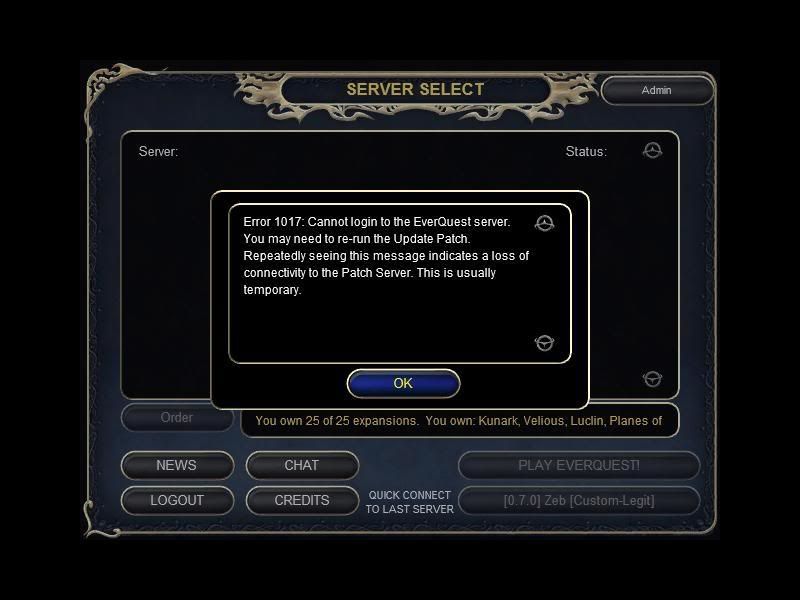
Now that keeps coming up.
Re-Run the update patcher? I thought I wasn't supposed to run any patcher. period. |
02-05-2009, 05:33 PM
|
|
Dragon
|
|
Join Date: Feb 2007
Posts: 659
|
|
You can still get that. That's just an error the client throws when it's having trouble with the connection. I usually get it when I forget that I turned my server off to update it and forgot to turn it back on.
|
02-05-2009, 05:44 PM
|
|
Fire Beetle
|
|
Join Date: Feb 2009
Location: America
Posts: 21
|
|
I see.
That doesn't help me though.
What could possibly be blocking me from getting on eq?
|
02-05-2009, 07:12 PM
|
|
Fire Beetle
|
|
Join Date: Feb 2009
Location: America
Posts: 21
|
|
So it turns out my isp put a cap on my internet of some sort. I called them and they took it off. Now I can make it to the server select screen but the screen goes black after I select my server, then kicks me back to the login screen.
What.
The.
Duece.
|
02-05-2009, 08:20 PM
|
|
Fire Beetle
|
|
Join Date: Feb 2009
Location: America
Posts: 21
|
|
So heres what I decided to do.
I set up a server and client system with my laptop at a friend of mines house. How it works Is I log onto my laptop in a window from my computer at home, and from there I play eq on my laptop, just at my house. It's working pretty good. Lawl. I'm not sure why eq wont let me log on at my house, I like to think its god's way of saying Take that!
Whatever works tho.
Thank you everyone who helped me out,
|
 Posting Rules
|
You may not post new threads
You may not post replies
You may not post attachments
You may not edit your posts
HTML code is Off
|
|
|
All times are GMT -4. The time now is 03:16 AM.
|
|
 |
|
 |
|
|
|
 |
|
 |
|
 |





 Linear Mode


